📬 Email Security Explained
Why DMARC Matters
- and What Happens If You Ignore It
Someone could be sending emails pretending to be your company right now. DMARC is the protocol that stops them. Here's everything you need to know, explained in plain English.
8 min read · Last updated February 2026
The Problem: Your Email Identity Has No Lock On It
Email was invented in 1971. Security was not a priority. The result is a system that, by default, lets anyone send an email claiming to be anyone. I can sit down right now and send a message that looks exactly like it came from ceo@yourcompany.com — and without the right protections in place, your email servers will accept it.
This is called email spoofing, and it's one of the most common techniques used in phishing attacks, business email compromise, and brand impersonation scams. The FBI estimates business email compromise cost companies over $2.7 billion in a single year.
DMARC — which stands for Domain-based Message Authentication, Reporting, and Conformance — is the protocol that fixes this. It tells receiving mail servers: "Here's who is authorized to send email on behalf of my domain. If you receive an email claiming to be from me but failing these checks, here's what to do with it: reject it, quarantine it, or at minimum, tell me about it."
Real World Impact
A small accounting firm had their domain spoofed. An attacker sent "invoice" emails to the firm's clients appearing to come from the firm's real email address. Three clients wired money to a fraudulent account before anyone realized. The firm lost clients, reputation, and spent months dealing with the fallout — all of which was preventable with a properly enforced DMARC policy.
The Three Pillars: SPF, DKIM, and DMARC
DMARC doesn't work alone. It works together with two other email authentication standards. Here's a quick plain-English breakdown of all three:
SPF - the Authorized Sender List
SPF (Sender Policy Framework) is a DNS record on your domain that lists every server authorized to send email on your behalf. Think of it as a guest list at a club. When an email arrives claiming to be from you, the receiving server checks: "Is this email coming from a server on the list?" If not, it's suspicious.
DKIM - The Digial Signature
DKIM (DomainKeys Identified Mail) works like a wax seal on a letter. Every legitimate email you send gets cryptographically signed by your mail server. The receiving server can verify the seal hasn't been broken — meaning the email really did come from you and wasn't tampered with in transit.
DMARC - The Policy That Ties It Together
DMARC is the policy layer that sits on top of SPF and DKIM. It tells receiving servers what to do when an email fails those checks, and critically — it instructs those servers to send you a report about every email they processed on your domain's behalf.
Those reports are the basis of everything that follows. Without DMARC, you're flying blind.
What Actually Happens When You Ignore DMARC
Setting up DMARC in "monitor only" mode and then forgetting about it is extremely common. The reports pile up in an inbox, unread, in XML format that nobody can parse at a glance. And during that time, any of the following can be happening:
🎭
Attackers are spoofing your domain
Without enforcement, bad actors can send phishing emails that look identical to legitimate emails from your company. Your customers, partners, and employees become targets.
📉
Your legitimate emails are landing in spam
If your SPF or DKIM is misconfigured — which DMARC reports would immediately tell you — your own legitimate marketing or transactional emails may be silently dropped into spam folders.
⚙️
Third-party tools are sending without authorization
You added a new CRM, email marketing platform, or helpdesk tool, and someone didn't update your SPF record. Those sends are failing authentication. You'd never know without reading the reports.
Google and Yahoo now require it
As of 2024, Google and Yahoo require DMARC authentication for high-volume senders. Fall short and your emails to Gmail addresses face increased rejection rates.
📋
Compliance audits are getting harder to pass
SOC 2, HIPAA-adjacent audits, and cyber insurance applications increasingly ask about email authentication policies. "We have DMARC set to monitor and read the reports" is a very different answer than "we set it and forgot it."
What a DMARC Report Actually Looks Like
Every major email provider — Google, Microsoft, Yahoo, Apple — sends DMARC reports to the address you specify in your DNS record. They arrive every 24 hours, as email attachments. Here's the problem: they're XML files that look like this.
- What you receive in your inbox
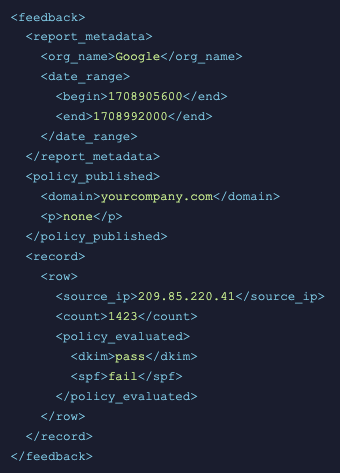
An actual DMARC aggregate report. Most people close this immediately.
- What MonitorDMARC Shows You Instead
94%
Pass Rate
28,410
Emails Processed
1,706
Failing ⚠️
Google (gmail.com)
18,240 emails
✓ Pass
Mailchimp (mcsv.net)
8,464 emails
✓ Pass
Unknown (185.220.x.x)
1,706 emails
✗ Fail
The XML above tells you the same thing as the dashboard — but one requires a degree in patience to interpret and the other tells you immediately: someone is failing authentication, and it's not one of your authorized services. That's the kind of thing you need to know about.
Good To Know
DMARC reports come in two types: RUA (aggregate reports) arrive daily from every major email provider — Google, Microsoft, Yahoo, Apple — summarizing all the emails processed under your domain. RUF (forensic reports) are generated only when individual emails fail authentication, and contain more detailed information about what went wrong. Not all providers send RUF reports, but they're invaluable when diagnosing specific failures.
The Right Way to Set Up DMARC
DMARC configuration follows a progression. The goal is to eventually reach p=reject — the policy that actively blocks spoofed emails — but you need to get there carefully to avoid accidentally blocking your own legitimate sends.
1
Start with p=none (Monitor Only)
This is the "eyes open, hands off" mode. You receive DMARC reports from every email provider that processes mail for your domain, but nothing is blocked or quarantined. This is where you start — it's safe, immediate, and gives you the data you need to proceed.
2
Read Your Reports and Identify All Legitimate Senders
Over 2-4 weeks, your reports will reveal every service sending email on your domain's behalf — your email host, your CRM, your marketing platform, your helpdesk software. Make sure each one has proper SPF and DKIM configured. This is where most organizations discover they've been overlooking something.
3
Move to p=quarantine
4
Advance to p=reject (Full Protection)
5
Keep Monitoring — Permanently
Why You Can't Just "Set It and Forget It"
Here's the uncomfortable truth: most businesses set up DMARC in monitor mode, glance at the first few XML emails, and then never look at the reports again. The DNS record is there. The box is checked. But they have no idea what's actually happening.
The problem is that your email ecosystem is not static. Things change:
You onboard a new marketing tool. Someone updates your SPF record and accidentally removes an authorized sender. A vendor changes their mail server IP. You move from one email platform to another. An attacker starts probing your domain. Each of these changes shows up in your DMARC reports — but only if someone is actually reading them.
That's why DMARC monitoring exists as a category. Parsing XML reports by hand, daily, across potentially dozens of domains, is not a reasonable use of anyone's time. Automated monitoring — with alerts when something changes or when failure rates spike — is how you actually stay on top of it.
A Common Scenario
Your team adds Zendesk for customer support. Zendesk sends emails on behalf of your domain. Nobody adds Zendesk's mail servers to your SPF record. Suddenly, 15% of your support emails are failing DMARC and landing in customers' spam folders. Support tickets go unanswered. Customer satisfaction drops. This plays out silently for months before someone notices — because nobody was reading the reports.
What to Look For in a DMARC Monitoring Tool
If you've decided you need proper DMARC monitoring (and you do), here's what actually matters when evaluating your options:
Automatic report parsing
This is the core job. The tool should receive your RUA and RUF reports, parse the XML automatically, and present the data in a readable format. No manual downloads, no spreadsheets.
Alerts on changes and failures
You shouldn't have to log in daily to check. When something changes — a new source starts failing, your pass rate drops, a DNS record is modified — you should get an email alert immediately.
DNS record monitoring
Your SPF, DKIM, DMARC, and BIMI records are living configuration. They can be changed accidentally by anyone with DNS access. Good tools monitor for changes and alert you when something shifts.
Data Retention
DMARC report data is more valuable over time. Trend analysis — "how has our pass rate changed over 6 months?" — requires historical data. Be skeptical of tools that only keep 30 or 90 days of data.
Transparent Pricing
Some DMARC vendors price on email volume in ways that make monthly costs unpredictable. Look for domain-based pricing where your bill doesn't depend on traffic spikes you can't control.
Stop Ignoring Your DMARC Reports
MonitorDMARC parses your RUA and RUF reports automatically, monitors your DNS records, and alerts you when something goes wrong. Starting at $19.99/month — less than half the price of most competitors.
No credit card required. Takes 5 minutes to set up
© 2026 MonitorDMARC. All rights reserved.